Tax
The Tax Reports section provides detailed insights into tax-related transactions recorded in the system. These reports help businesses monitor tax calculations, track tax liabilities, and generate official tax summaries required for financial reporting and compliance.
The Tax Report module contains three different reports:
- Tax Summary
- Tax Payable
- VAT Return 201
Each report provides specific tax-related information that helps users review tax collected, tax payable amounts, and statutory tax return data.
Tax Summary
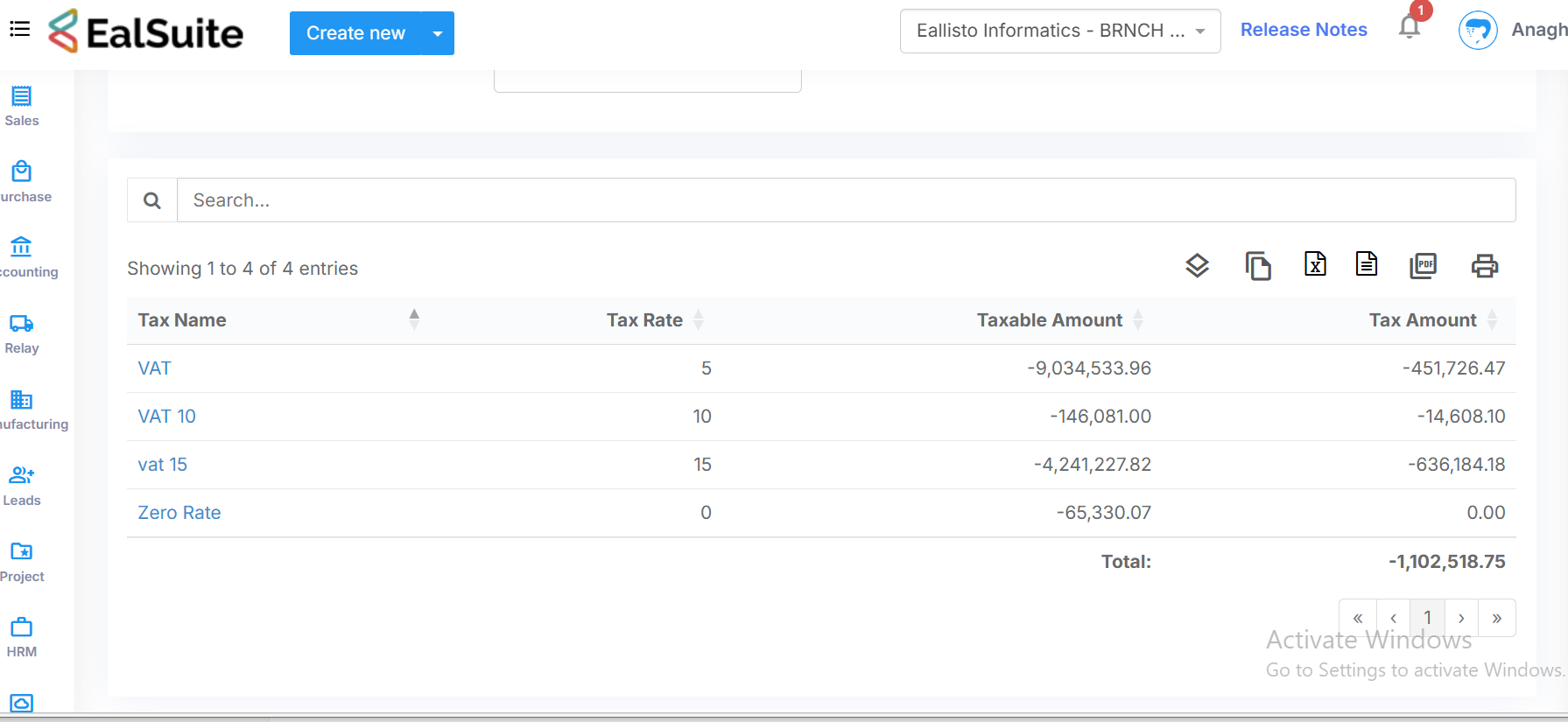
The Tax Summary Report provides an overview of all tax amounts applied to transactions within a selected period. It helps users analyze how much tax has been calculated and applied across different transactions.
This report helps businesses quickly understand the total tax collected and categorized by tax type.
| Column | Description | Calculation / Formula |
|---|---|---|
| Tax Name | Displays the name of the tax | Pulled from Tax Configuration |
| Tax Rate | Shows the percentage rate of the tax applied. | Defined in Tax Settings |
| Taxable Amount | Displays the total transaction amount on which the tax is calculated. | Based on transaction value |
| Tax Amount | Shows the calculated tax value for the taxable amount. | Taxable Amount × Tax Rate / 100 |
| Filter | Description |
|---|---|
| Date | Allows users to filter the report based on the selected date range. |
| Branch | Enables users to view report data related to a specific branch. |
Table footer
- Tax amount (total)
Tax Payable
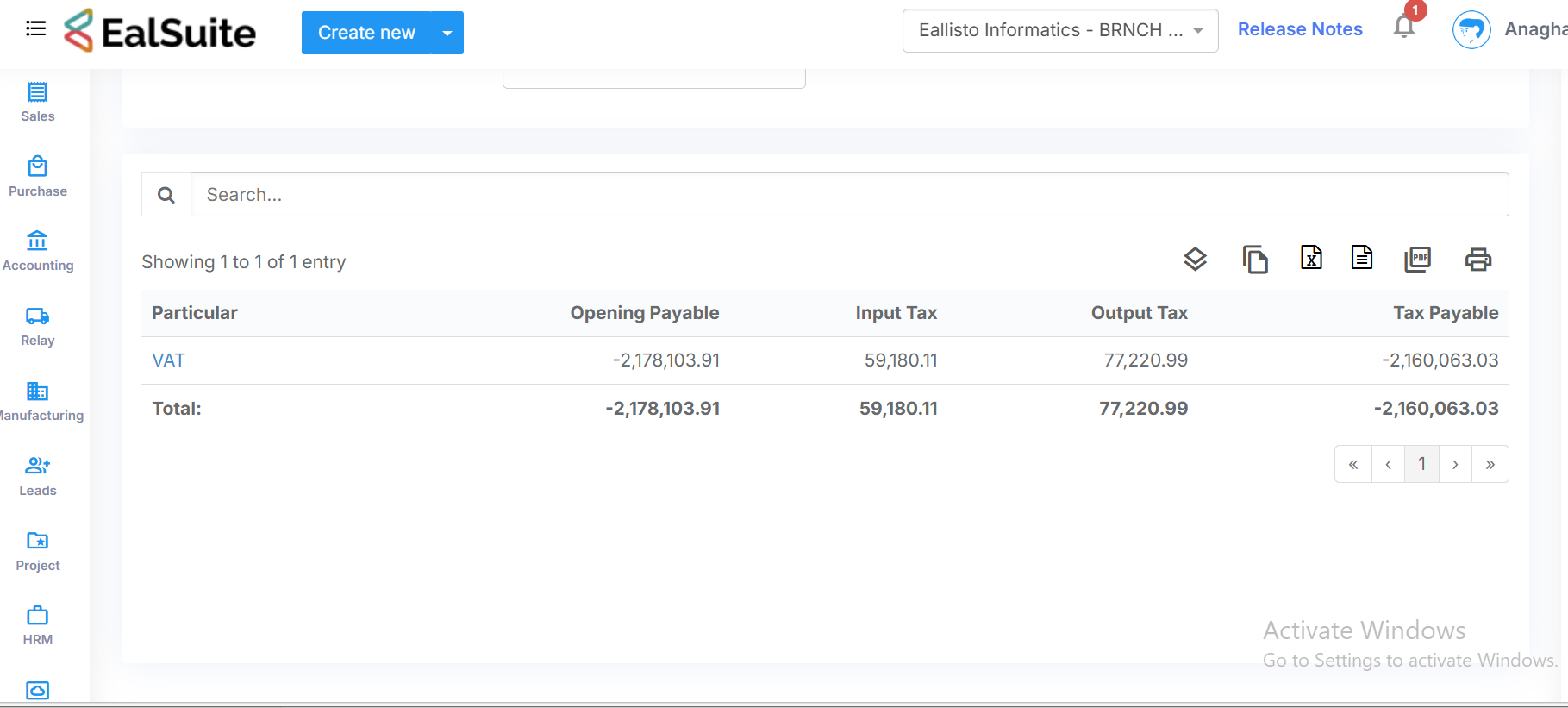
The Tax Payable Report provides a summary of the VAT tax liability for the selected period. It shows the opening payable tax balance, input tax from purchases, output tax from sales, and the final tax payable amount that needs to be remitted to the tax authority.
| Column | Description | Calculation / Formula |
|---|---|---|
| Particular | Displays the tax category or type related to the tax calculation. | Pulled from Tax Configuration |
| Opening Payable | The tax payable balance carried forward from the previous period. | From Opening Balance / Previous Period |
| Input Tax | The VAT amount paid on purchases or expenses. | Sum of VAT from Purchase Transactions |
| Output Tax | The VAT amount collected from sales transactions. | Sum of VAT from Sales Transactions |
| Tax Payable | The final VAT amount that must be paid to the tax authority. | Opening Payable + Output Tax − Input Tax |
| Filter | Description |
|---|---|
| Date | Allows users to filter the report based on the selected date range. |
| Branch | Enables users to view the tax payable report for a specific branch. |
Table Footer
- Opening Payable (total)
- Input tax (total)
- Output (total)
- Tax payable (total)
VAT Return 201
The VAT Returns 201 Report provides a structured summary of VAT transactions for a specific tax period, formatted according to the UAE Federal Tax Authority (FTA) VAT Return Form 201.
This report consolidates VAT-related data from sales, purchases, and expense transactions and organizes them into sections required for VAT filing. It allows businesses to review taxable amounts, VAT collected on sales, VAT recoverable on expenses, and the final VAT payable for the selected period.
The report is divided into three main sections:
- VAT on Sales and All Other Outputs
- VAT on Expenses and All Other Inputs
- Net VAT Due
These sections help businesses ensure accurate tax reporting and simplify the preparation of VAT returns before submitting them to the tax authority.
The report also includes an Export option to download the VAT return data for submission or record-keeping.
Report Columns
1. VAT on Sales and All Other Outputs
| Column | Description |
|---|---|
| No | Reference number corresponding to the VAT Return Form 201 section. |
| Particular | Description of the VAT category such as standard-rated supplies, reverse charge supplies, zero-rated supplies, etc. |
| Taxable Amount (₹) | Total value of taxable sales transactions for the category. |
| VAT Amount (₹) | VAT charged on the taxable sales amount. |
Categories Included
- Standard rated supplies by Emirate (Abu Dhabi, Dubai, Sharjah, Ajman, Umm Al Quwain, Ras Al Khaimah, Fujairah)
- Tax refunds to tourists
- Supplies subject to reverse charge
- Zero rated supplies
- Exempt supplies
- Goods imported into UAE
- Adjustments to imported goods
2. VAT on Expenses and All Other Inputs
| Column | Description |
|---|---|
| No | Reference number corresponding to the VAT Return Form section. |
| Particular | Expense category related to VAT input transactions. |
| Taxable Amount (₹) | Total value of taxable purchases and expenses. |
| Recoverable VAT Amount (₹) | VAT amount that can be reclaimed from the tax authority. |
Categories Included
- Standard rated expenses
- Supplies subject to reverse charge provisions
3. Net VAT Due
This section summarizes the final VAT liability for the selected period.
| No | Description |
|---|---|
| 12 | Total value of due tax for the period (Output VAT collected from sales). |
| 13 | Total value of recoverable tax for the period (Input VAT from expenses). |
| 14 | Payable tax for the period. |
Calculation
VAT Payable = Output VAT − Recoverable VAT
Report Filters
| Filter | Description |
|---|---|
| Date Range | Selects the tax reporting period for the VAT return. |
| TRN / VAT Registration Number | Displays VAT return details associated with the selected tax registration number. |
Report Footer
| Section | Footer Description |
|---|---|
| VAT on Sales | Total taxable amount and VAT collected from sales transactions. |
| VAT on Expenses | Total taxable amount and recoverable VAT from purchases and expenses. |
| Net VAT Due | Final VAT payable or refundable for the selected period. |
Note:
The VAT Returns 201 report aligns with the UAE VAT Return Form 201 structure, enabling businesses to review their tax position and prepare VAT filings accurately for the selected reporting period.
Last updated: July 24, 2026