Account
Day Book
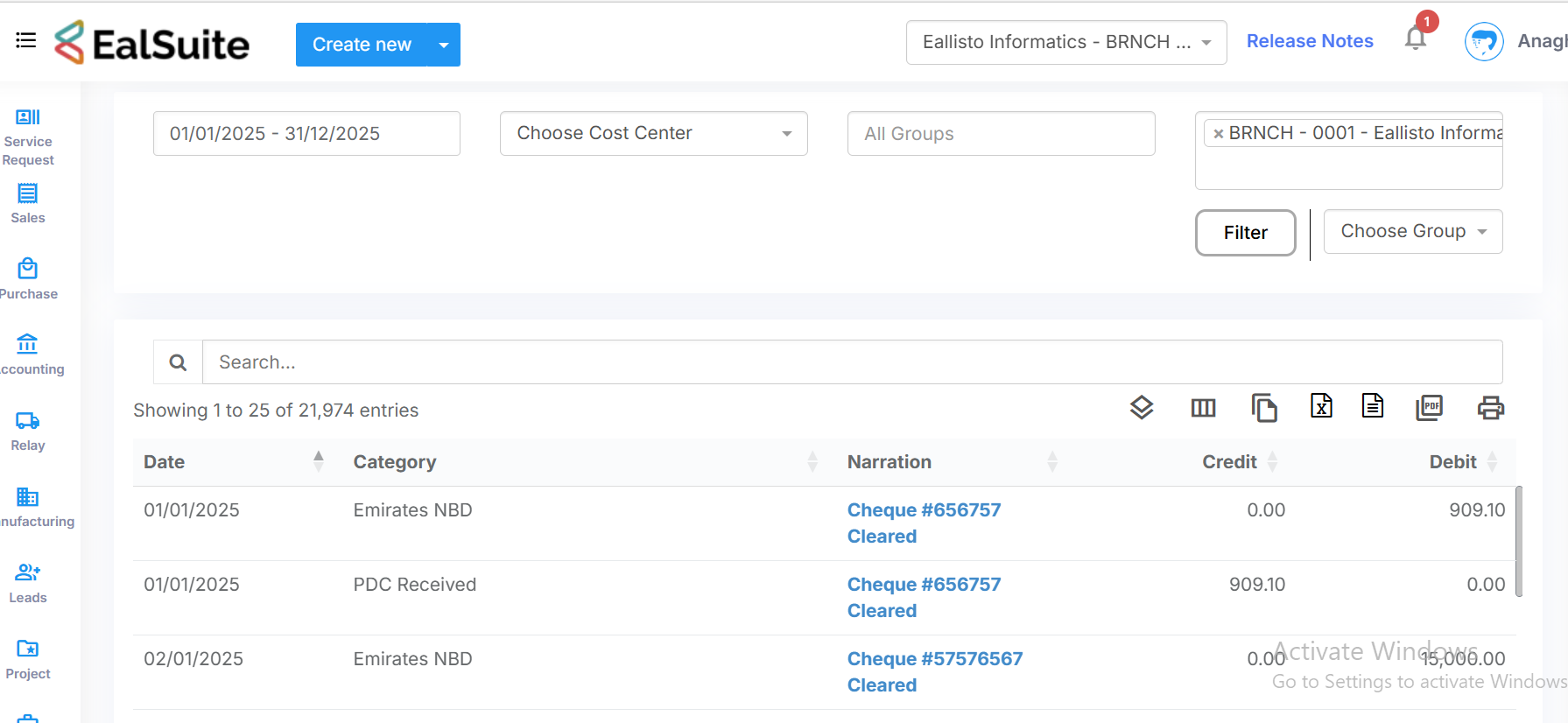
Day Book is an accounting record that shows all financial transactions of a business in chronological order for a specific day. It provides a daily summary of transactions such as receipts, payments, and other accounting entries recorded in the system.
| Column | Description | Calculation/Formula (Optional) |
|---|---|---|
| Date | The data given in the ‘Date’ field of the transaction | Format: DD/MM/YYYY |
| Category | Ledger or account category under which the transaction falls.Any account from ‘Chart of accounts’ in EalSuite | Pulled from Chart of Accounts |
| Narration | Data given in the ‘Reference’ field of the transaction. | Example: Invoice Payment, Bank Transfer |
| Credit | The amount credited in this transaction. | amount recorded on the credit side of a transaction |
| Debit | The amount debited in this transaction. | amount recorded on the debit side of a transaction |
| Filter Name | Description |
|---|---|
| Date Range | Allows users to select a specific time period for viewing transactions. |
Format: DD/MM/YYYY – DD/MM/YYYY | |
| Cost Center | Enables filtering by cost center (optional). Helps isolate expenses/income allocated to specific departments or business units. |
| Account Group | Filters entries based on group classification of ledgers. Examples include: |
| • Sales • Direct Income • Indirect Income • Purchase • Direct Expense • Indirect Expense • Fixed Asset • Current Asset • Loans (Liability) • Current Liabilities • Capital Account • Suspense Account | |
| Branch | Used to select one or more branches from which the transaction originated. |
| Sorting By Group | Date : Sorts transactions chronologically. Useful for reviewing daily entries.Category : Sorts entries alphabetically by ledger/account category. |
- Table Footer
- Credit (total)
- Debit(total)
Account statement
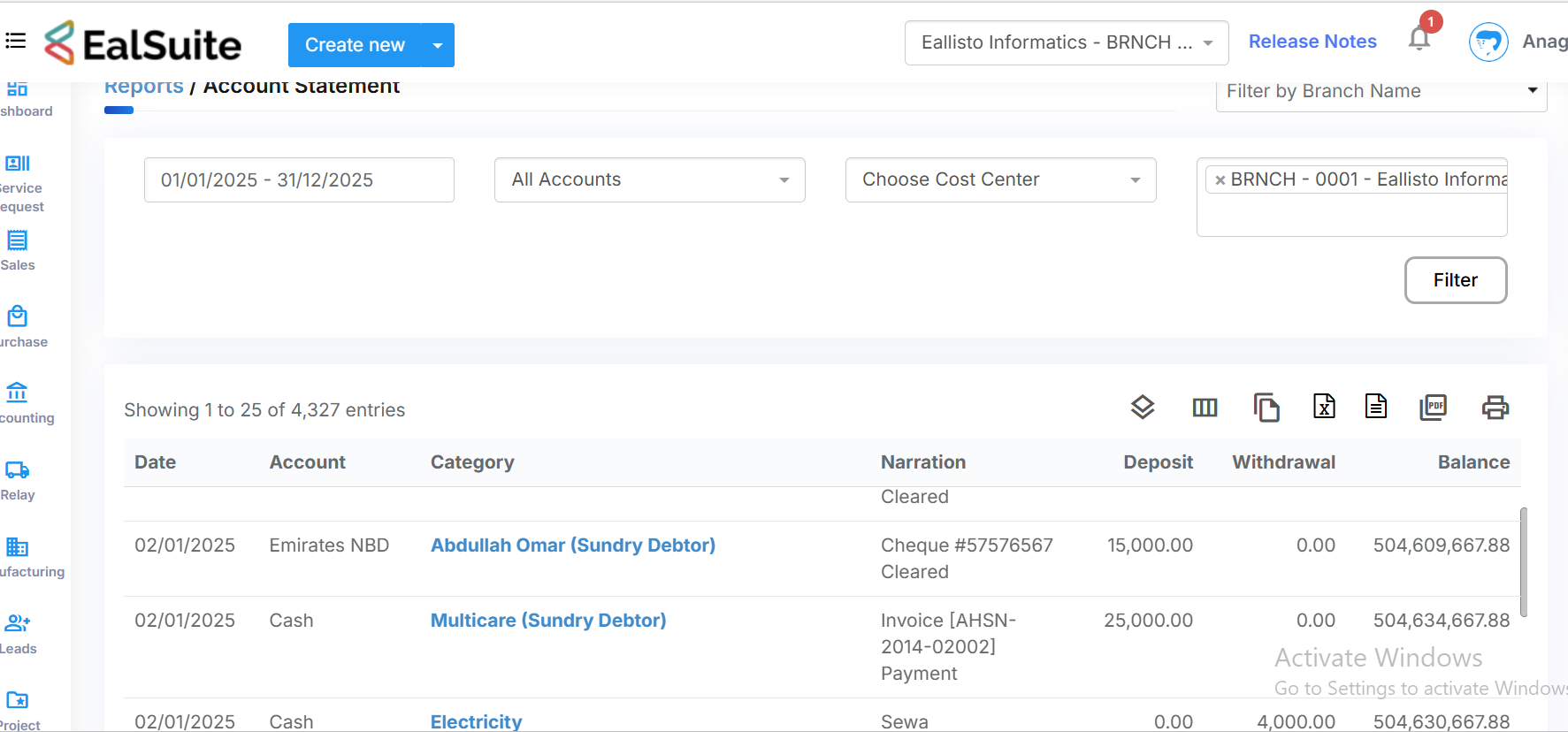
The Account Statement Report provides a detailed record of all transactions related to a specific account within a selected period. It shows how money has moved in and out of the account, including deposits, withdrawals, and the running balance.
This report helps users track account activity, verify financial records, and understand the current balance and transaction history of the account.
| Column | Description | Calculation / Formula (Optional) |
|---|---|---|
| Date | The data given in the ‘Date’ field of the transaction | Format: DD/MM/YYYY |
| Account | Name of the account against which the transaction is made Type: Bank Account, Cash in Hand Account, Credit Card Account, Bank O/D Account etc. | Pulled from Chart of Accounts |
| Category | The counterparty or transaction counterpart ledger. | Usually the secondary party (e.g., Sundry Debtors) |
| Narration | Description or note for the transaction. | Example: Invoice Payment, Bank Transfer |
| Deposit | Amount credited to the account (inflow). | Positive amount added to the balance |
| Withdrawal | Amount debited from the account (outflow). | Subtracted from the balance |
| Balance | Running balance of the account after each transaction. | Previous Balance + Deposit - Withdrawal |
| Filter Name | Description |
|---|---|
| Date Range | Allows users to select a specific time period for viewing account transactions. Format: DD/MM/YYYY – DD/MM/YYYY |
| Account | Filters transactions based on the selected account. |
| Cost Center | Enables filtering transactions based on the selected cost center. |
| Branch | Used to filter transactions based on the branch from which the transaction originated. |
Table footer
- Deposit (total)
- withdrawal (total)
Trial Balance
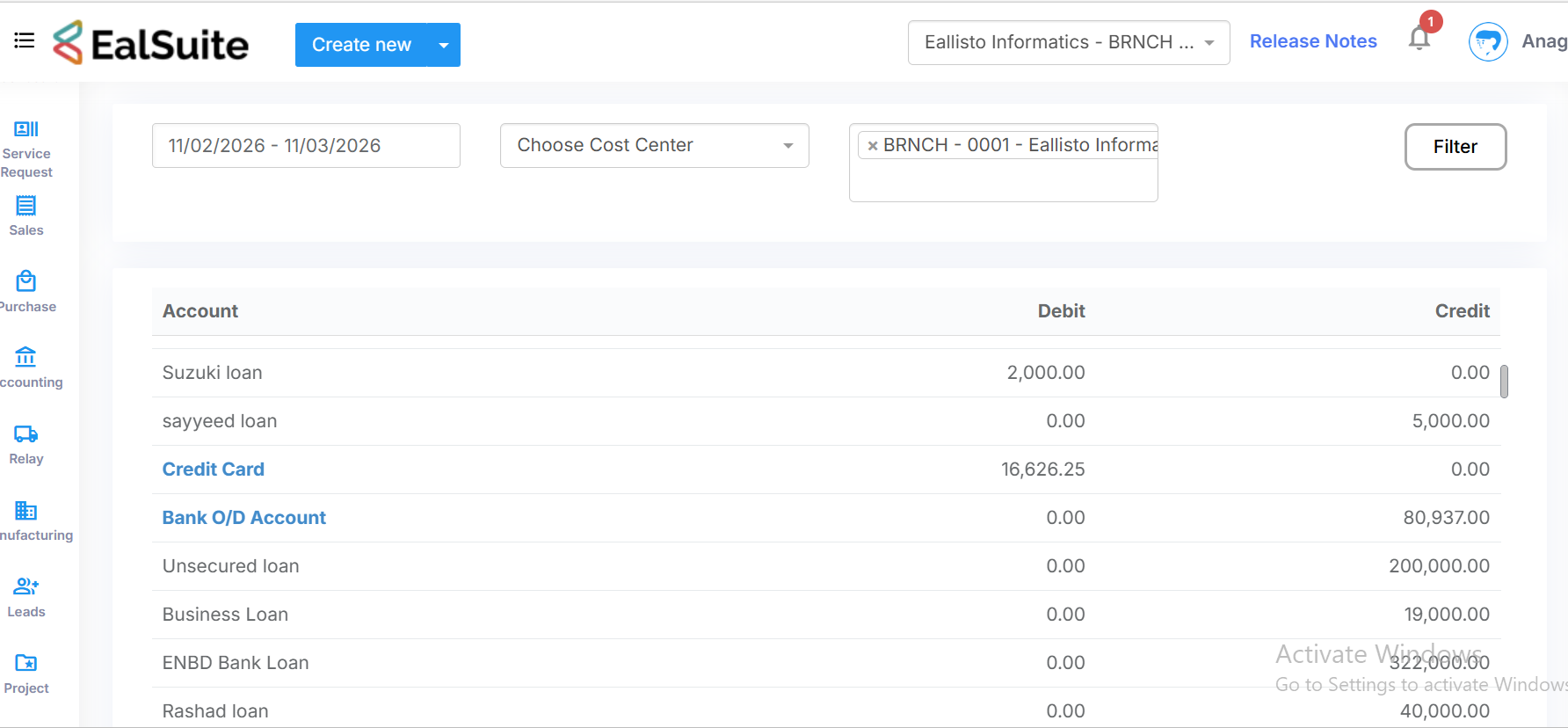
Trial Balance is an accounting report that summarises the balances of all accounts at a specific point in time. It displays the total debit and credit balances of each account to verify that the accounting records are balanced. The total debit amount and total credit amount in the report should be equal.
| Column | Description | Calculation/Formula (Optional) |
|---|---|---|
| Account | The name of the ledger account included in the report. | Pulled from Chart of Accounts |
| Debit | The total debit balance recorded for the account. | Sum of all debit entries for the account |
| Credit | The total credit balance recorded for the account. | Sum of all credit entries for the account |
| Filter Name | Description | |
|---|---|---|
| Date Range | Allows users to select the time period for generating the trial balance report. Format: DD/MM/YYYY – DD/MM/YYYY | |
| Cost Center | Enables filtering the report based on the selected cost center. | |
| Branch | Allows filtering the report based on the selected branch. |
Table Footer
- Debit (total)
- Credit (total)
Profit And Lose
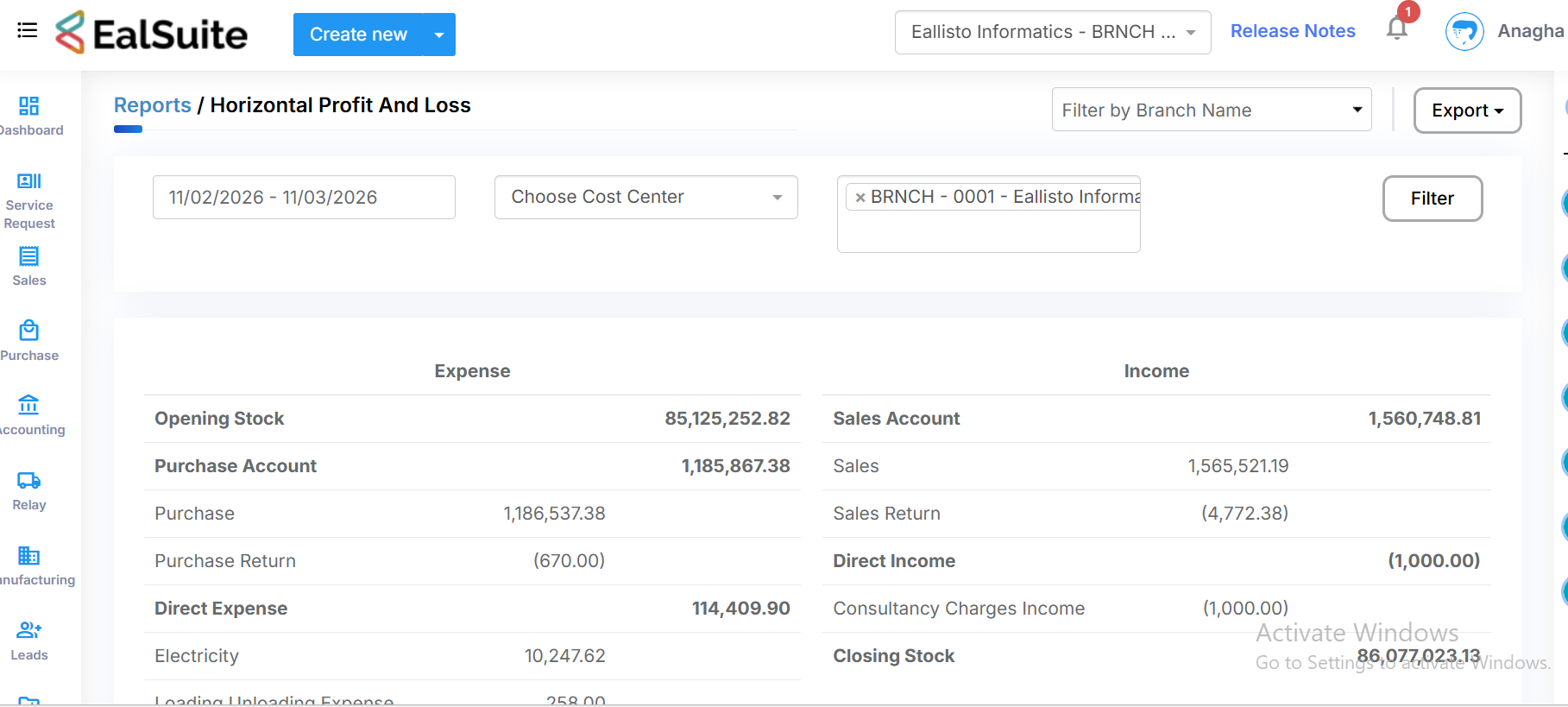
Profit & Loss is a financial report that summarizes the company’s income and expenses during a specific period. It helps evaluate the financial performance of the business by calculating the gross profit and net profit based on the recorded transactions.
| Column | Description | Calculation/Formula (Optional) |
|---|---|---|
| Expense | Displays all expense-related accounts such as opening stock, purchase accounts, direct expenses, and indirect expenses recorded in the system including opening stock. | Pulled from expense accounts in the ledger |
| Income | Displays all income-related accounts such as sales accounts and other income generated by the business including closing stock | Pulled from income accounts in the ledger |
| Gross Profit | Represents the profit earned from core business activities before deducting indirect expenses. | opening stock +Income − Direct Expenses-closing stock |
| Net Profit | The final profit after subtracting all expenses from total income. | Gross Profit − Indirect Expenses |
| Total | Displays the total amount for both the expense and income sides of the report to ensure the report balances correctly. | System calculated |
| Filter Name | Description |
|---|---|
| Date Range | Allows users to select the time period for generating the Profit & Loss report. Format: DD/MM/YYYY – DD/MM/YYYY |
| Cost Center | Enables filtering the report based on the selected cost center. |
| Branch | Allows users to filter the report based on the selected branch. |
Table Footer
- Expense (total)
- Income (total)
Balance Sheet
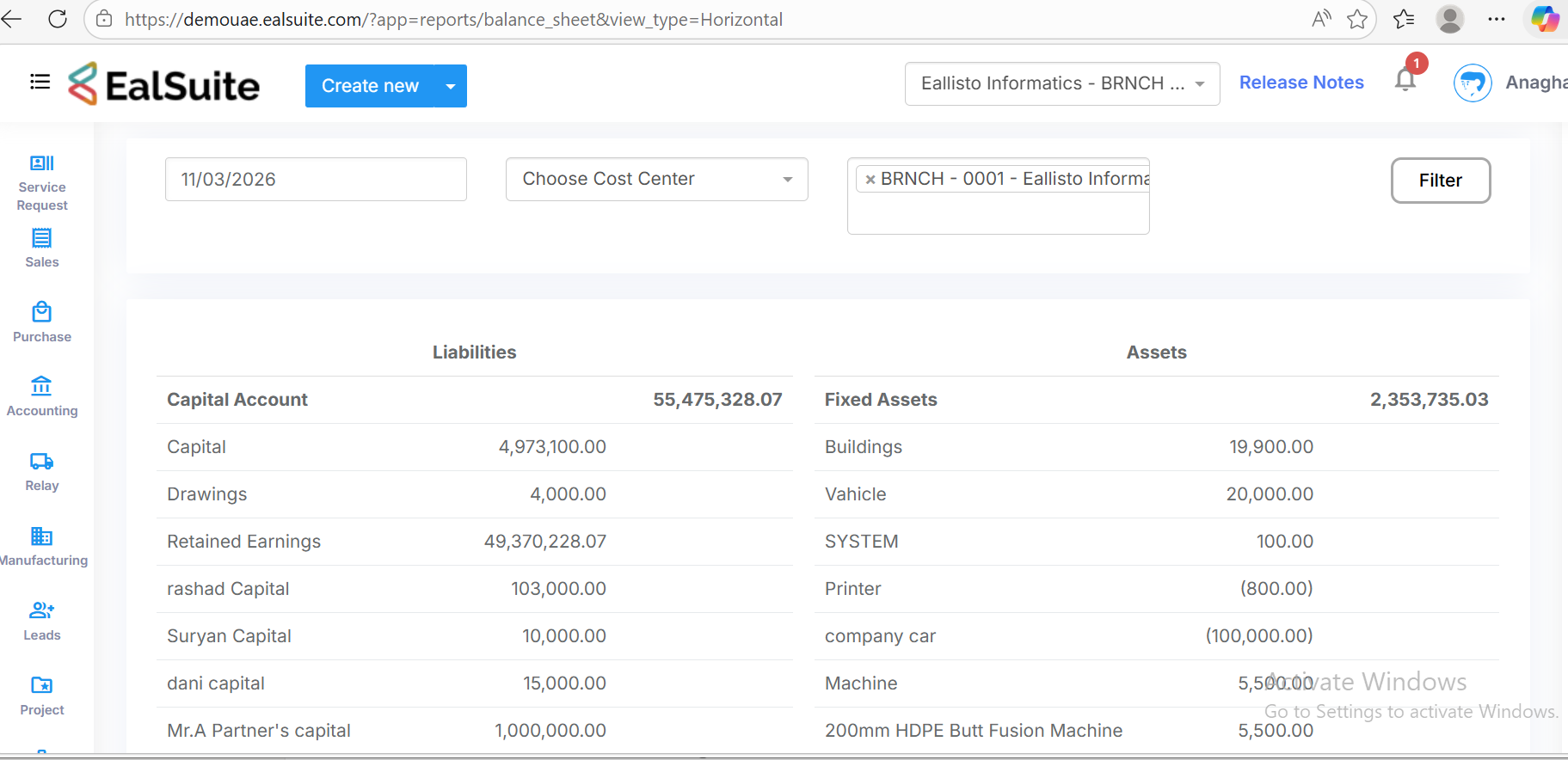
A Balance Sheet is a financial report that shows the financial position of a business at a specific point in time. It summarizes what the company owns (Assets) and what it owes (Liabilities) along with the owner’s equity. The balance sheet helps understand the company’s financial stability and overall value.
| Column | Description | |
|---|---|---|
| Assets | Displays all the resources owned by the company such as cash, bank balance, inventory, receivables, and other assets. | |
| Liabilities | Displays all the obligations or debts of the company such as loans, payables, and other liabilities. |
Filter
| Filter Name | Description |
|---|---|
| Date | Allows users to generate the balance sheet for a specific date. |
| Cost Center | Filters the report based on the selected cost center. |
| Branch | Filters the report based on the selected branch. |
Table Footer
- Asset (Total)
- Liabilities (Total)
Opening Balance
The Opening Balance Report displays the initial balances recorded in the system before regular transactions begin. These balances represent the financial position carried forward from a previous accounting period.
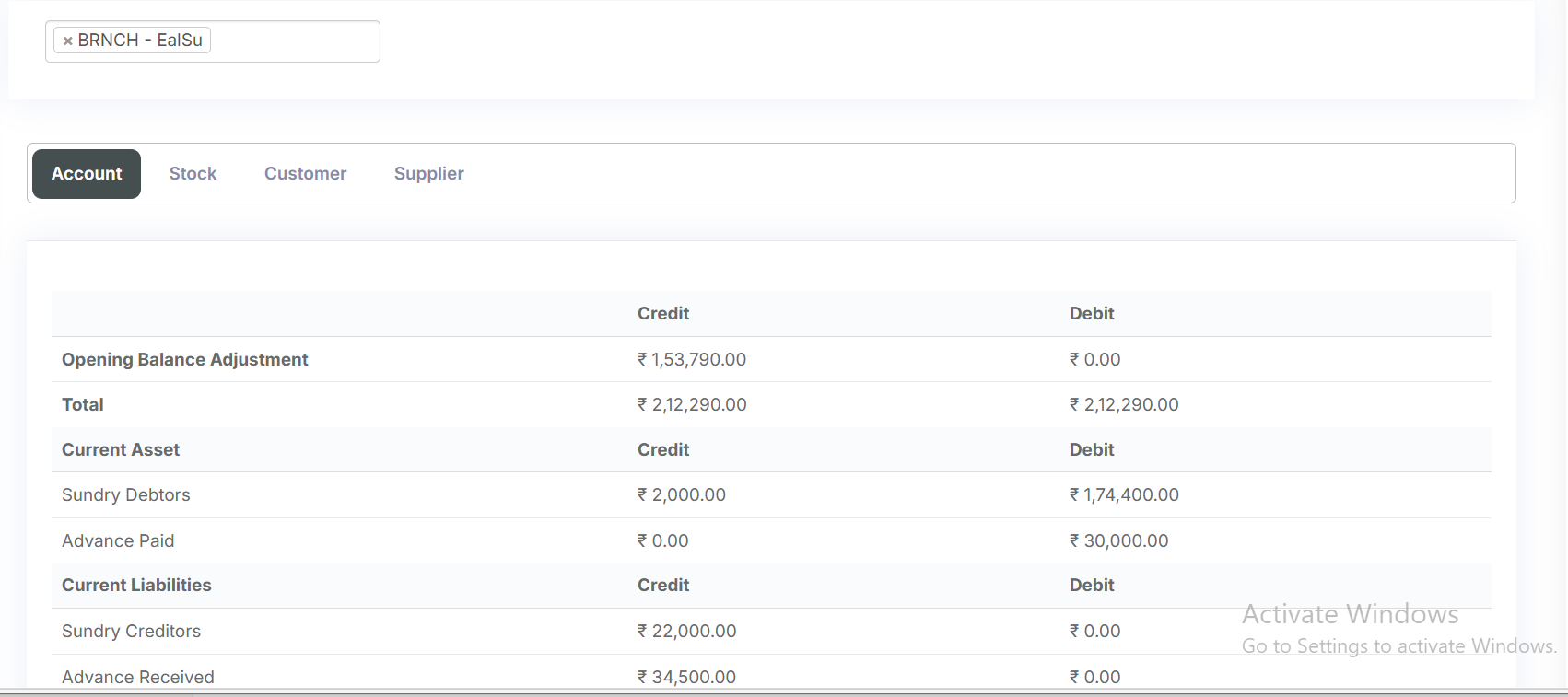
The report classifies opening balances into four main sections: Accounts, Stock, Customers, and Suppliers. Each section shows the Debit and Credit values based on the opening balances entered in the system.
Opening balances are usually added from the Opening Balance module in Settings, and some modules also allow adding opening balances during the record creation process.
| Column | Description |
|---|---|
| Account / Name | Displays the account, customer, supplier, or stock item for which the opening balance is recorded. |
| Debit | Shows the debit amount entered as the opening balance. |
| Credit | Shows the credit amount entered as the opening balance. |
| Section | Description |
|---|---|
| Account | Displays opening balances for ledger accounts created in the system. |
| Stock | Shows opening quantities and values of inventory items. |
| Customer | Displays opening balances for customer accounts such as outstanding receivables. |
| Supplier | Displays opening balances for supplier accounts such as outstanding payables. |
Last updated: July 24, 2026