Manufacturing
Raw Material Consumption Report
Report Overview
The Raw Material Consumption Report provides insights into the consumption of raw materials used during manufacturing processes. It helps businesses monitor how materials are utilized across manufacturing orders and track the quantities consumed for producing finished goods.
This report captures important details such as manufacturing references, items consumed, quantities used, material cost, and completion status. It enables production teams to analyze material usage efficiency and identify potential wastage or excess consumption during production.
It also includes export and viewing options such as Entries, Columns, Copy, Excel, CSV, PDF, and Print, along with a Search feature to quickly locate specific production records.
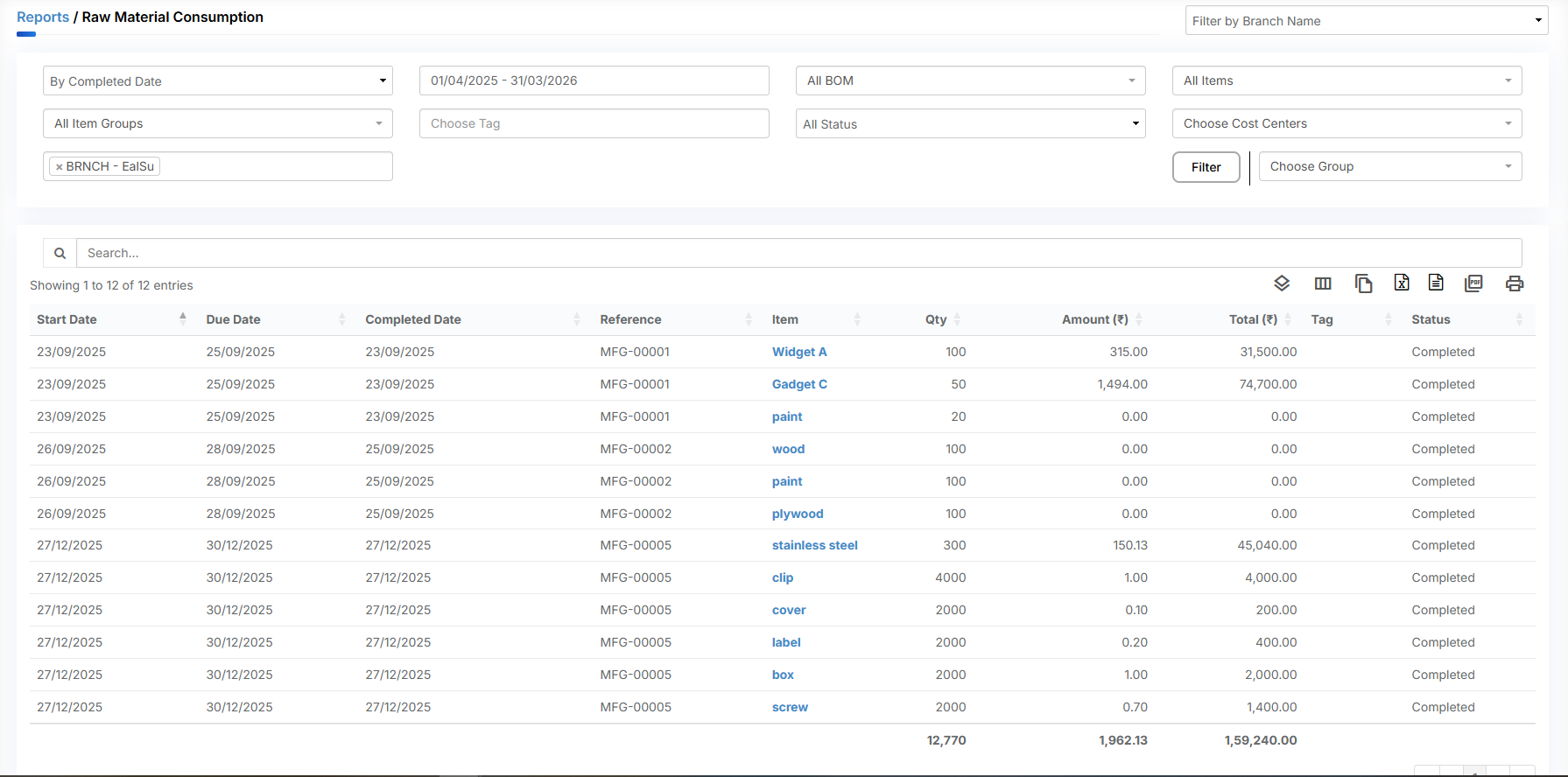
Report Columns
| Column | Description | Calculation / Formula (Optional) |
|---|---|---|
| Start Date | Date when the manufacturing process started. | Format: DD/MM/YYYY |
| Due Date | Planned completion date for the manufacturing order. | Defined in manufacturing order |
| Completed Date | Date when the manufacturing process was completed. | Recorded upon completion |
| Reference | Manufacturing reference number associated with the production order. | Generated during manufacturing creation |
| Item | Raw material or component consumed in the manufacturing process. | Pulled from Item Master |
| Qty | Quantity of the raw material consumed. | Entered or calculated during production |
| Amount (₹) | Cost per unit of the raw material consumed. | Pulled from item valuation |
| Total (₹) | Total cost of raw material consumed. | Qty × Amount |
| Tag | Tag assigned to the manufacturing or item record for categorization. | Pulled from system tags |
| Status | Current manufacturing status such as Completed. | Pulled from manufacturing order |
Report Filters
| Filter Name | Description |
|---|---|
| By Completed Date / By Start Date / By Due Date | Allows users to choose the date basis used for filtering manufacturing records. |
| Date Range | Filters manufacturing records based on the selected time period. |
| All BOM | Allows filtering records by specific Bill of Materials (BOM) used in manufacturing. |
| All Items | Filters records based on selected raw materials or components. |
| All Item Groups | Filters materials based on their item group classifications. |
| Choose Tag | Filters records based on tags assigned to manufacturing or items. |
| All Status | Filters manufacturing records by status such as In Progress, Completed, or Cancelled. |
| Choose Cost Centers | Displays manufacturing records associated with a selected cost center. |
| Filter by Branch Name | Filters manufacturing records based on branch location. |
| Choose Group | Allows grouping or filtering records based on a selected field. |
Report Footers
| Footer Field | Description |
|---|---|
| Qty | Total quantity of raw materials consumed across all manufacturing records. |
| Amount (₹) | Total unit cost of the raw materials listed in the report. |
| Total (₹) | Total cost of raw materials consumed in the manufacturing processes. |
- Finished Goods
Finished Goods Report
Report Overview
The Finished Goods Report provides insights into items produced through manufacturing processes. It helps businesses track the quantity and value of finished goods generated from production orders.
This report displays important manufacturing details such as start date, due date, completion date, production reference, finished item produced, quantity manufactured, unit cost, and total production value. It enables production teams to monitor completed manufacturing orders and analyze the output generated from production activities.
It also includes export and viewing options such as Entries, Columns, Copy, Excel, CSV, PDF, and Print, along with a Search feature to quickly locate specific production records.
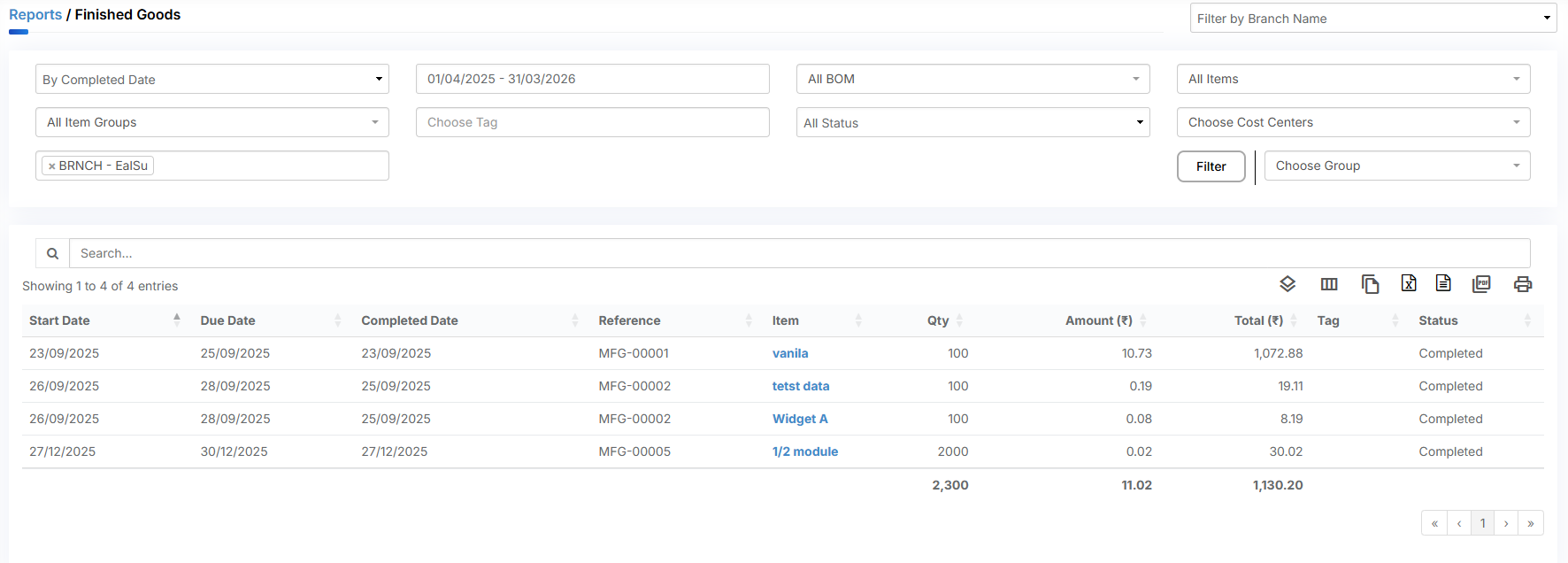
Report Columns
| Column | Description | Calculation / Formula (Optional) |
|---|---|---|
| Start Date | Date when the manufacturing process started. | Format: DD/MM/YYYY |
| Due Date | Planned completion date for the manufacturing order. | Defined in manufacturing order |
| Completed Date | Date when the production process was completed. | Recorded when manufacturing is completed |
| Reference | Manufacturing reference number associated with the production order. | Generated during manufacturing creation |
| Item | Finished good produced from the manufacturing process. | Pulled from Item Master |
| Qty | Quantity of finished goods produced. | Recorded during manufacturing completion |
| Amount (₹) | Cost per unit of the finished good produced. | Pulled from item valuation |
| Total (₹) | Total production value of the finished goods. | Qty × Amount |
| Tag | Tag associated with the finished good or manufacturing record. | Pulled from system tags |
| Status | Current manufacturing status such as Completed.. | Pulled from manufacturing order |
Report Filters
| Filter Name | Description |
|---|---|
| By Completed Date / By Start Date / By Due Date | Allows users to choose the date basis used for filtering production records. |
| Date Range | Filters production records within the selected time period. |
| All BOM | Filters finished goods based on the Bill of Materials (BOM) used in manufacturing. |
| All Items | Filters records based on selected finished goods. |
| All Item Groups | Filters finished goods based on item group classifications. |
| Choose Tag | Filters records based on assigned tags. |
| All Status | Filters manufacturing records by status such as Completed, In Progress, or Cancelled. |
| Choose Cost Centers | Displays production records associated with selected cost centers. |
| Filter by Branch Name | Filters production records based on branch location. |
| Choose Group | Allows grouping of records based on a selected field. |
Report Footers
| Footer Field | Description |
|---|---|
| Qty | Total quantity of finished goods produced in the report. |
| Amount (₹) | Total unit value of the finished goods listed in the report. |
| Total (₹) | Total production value of finished goods generated from manufacturing. |
Manufacturing Expense Report
Report Overview
The Manufacturing Expense Report provides insights into the additional costs incurred during manufacturing processes. It helps businesses track operational expenses related to production such as electricity, wages, loading and unloading charges, freight, and other manufacturing-related costs.
This report captures important production details including manufacturing reference, expense category, expense amount, completion status, and production dates. It enables organizations to monitor production-related expenses and analyze the cost associated with manufacturing orders.
It also includes export and viewing options such as Entries, Columns, Copy, Excel, CSV, PDF, and Print, along with a Search feature to quickly locate specific expense records.
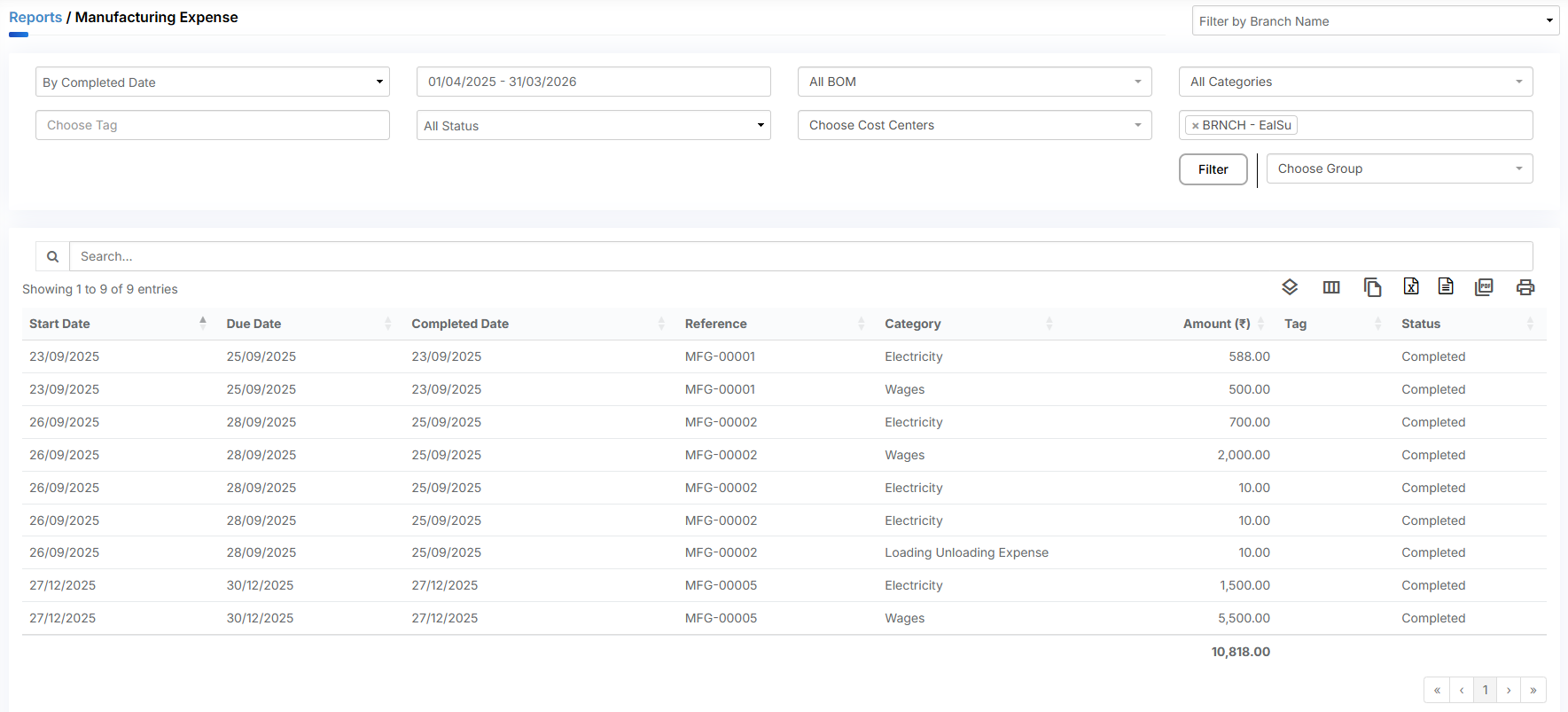
Report Columns
| Column | Description | Calculation / Formula (Optional) |
|---|---|---|
| Start Date | Date when the manufacturing process started. | Format: DD/MM/YYYY |
| Due Date | Planned completion date for the manufacturing order. | Defined during manufacturing order creation |
| Completed Date | Date when the manufacturing process was completed. | Recorded when production is completed |
| Reference | Manufacturing reference number associated with the production order. | Generated during manufacturing creation |
| Category | Category of expense incurred during manufacturing (e.g., Electricity, Wages, Freight). | Pulled from expense category records |
| Amount (₹) | Expense amount incurred for the specific category. | Recorded during expense entry |
| Tag | Tag assigned to the manufacturing expense for categorization. | Pulled from system tags |
| Status | Current status of the manufacturing order such as Completed. | Pulled from manufacturing order |
Report Filters
| Filter Name | Description |
|---|---|
| By Completed Date / By Start Date / By Due Date | Allows users to select the date basis for filtering manufacturing expense records. |
| Date Range | Filters manufacturing expense records within the selected time period. |
| All BOM | Filters expense records based on the Bill of Materials (BOM) used in manufacturing. |
| All Categories | Filters expenses based on selected expense categories. |
| Choose Tag | Filters records based on assigned tags. |
| All Status | Filters manufacturing records by status such as Completed, In Progress, or Cancelled. |
| Choose Cost Centers | Displays expense records associated with selected cost centers. |
| Filter by Branch Name | Filters expense records based on the selected branch. |
| Choose Group | Allows grouping of records based on a selected field for analysis. |
Report Footers
| Footer Field | Description |
|---|---|
| Amount (₹) | Total manufacturing expense recorded across all listed production records. |
Last updated: July 24, 2026