Chart of Accounts
A Chart of Accounts (COA) is a structured list of all financial accounts used by a company to record and organize its transactions.
It acts as the backbone of the Accounting module, ensuring that every financial transaction is properly categorized and recorded under the correct account.
In simple terms, the Chart of Accounts defines:
- Where income is recorded
- Where expenses are recorded
- Where assets and liabilities are maintained
- How financial reports like Profit & Loss and Balance Sheet are generated
Each account in the system (such as Cash, Bank, Sales, Rent, Loans, etc.) is created under the Chart of Accounts and used while recording transactions like Expense, Deposit, Transfer, and Journal.
A well-structured Chart of Accounts ensures accurate reporting, better financial tracking, and proper compliance with accounting standards.
In Ealsuite, when you navigate to the Chart of Accounts section, you will see a list of accounts that are already available by default. These default accounts are system-defined to help manage the company’s accounting structure efficiently.
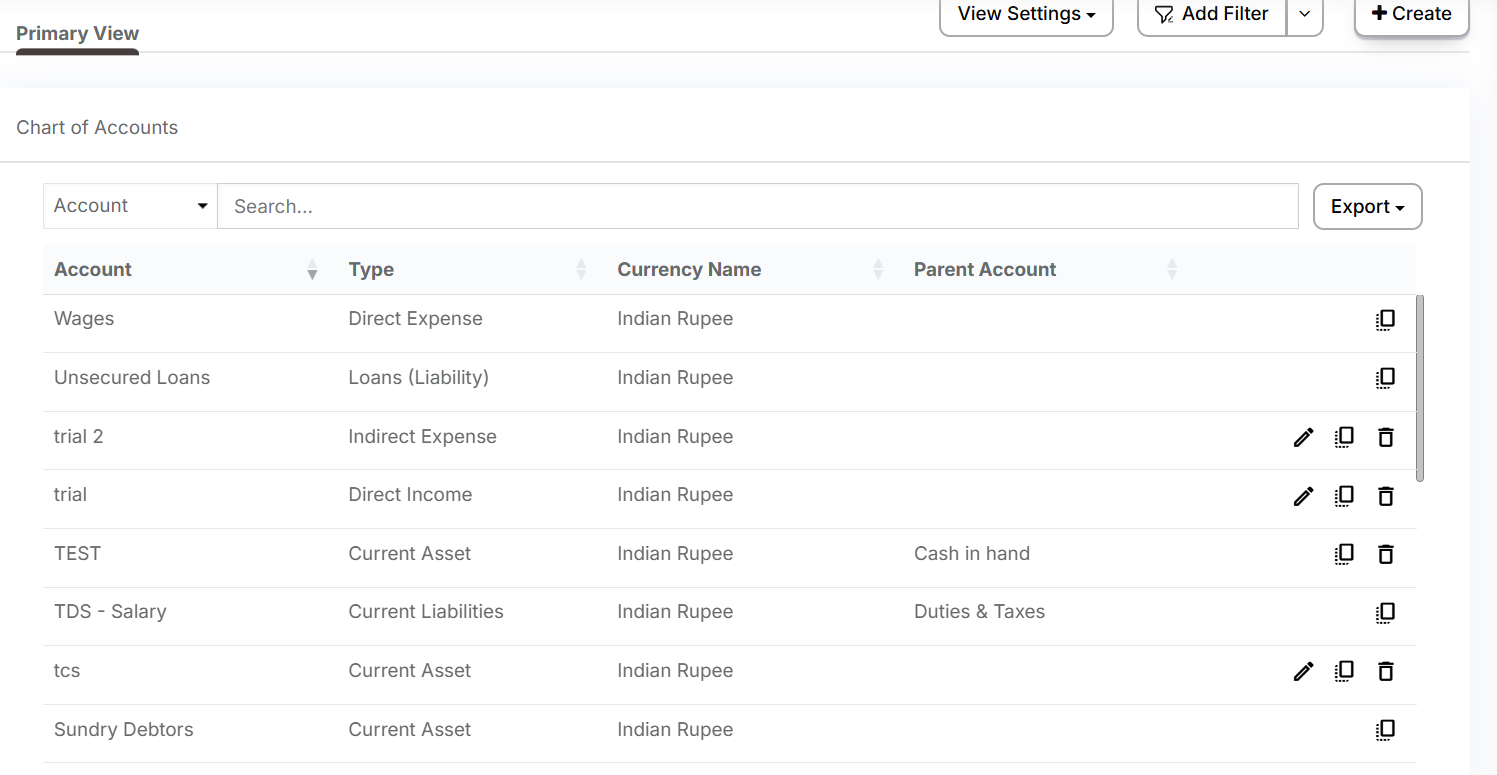
When you open the Smart View, you can see the list of available accounts along with relevant details such as:
- Account Name
- Type
- Currency Name
- Parent Account
The Parent Account column shows the hierarchy of the account, indicating under which main account the specific account is grouped.
This hierarchical structure ensures better organization and accurate financial reporting.
Validation Rules
The system includes predefined default accounts that are essential for accounting operations.
Important rules:
- Default accounts cannot be edited or deleted.
- User-created accounts can be edited or deleted.
However, there is an important validation:
Once a transaction (Expense, Deposit, Journal, etc.) is created using a specific Chart of Account, that account cannot be deleted.
- Create Chart of Account
In the Chart of Accounts Smart View, you will find the Create option on the top right corner.
When you click on Create, you will be redirected to the Chart of Account Creation Form.
The form includes the following fields:
- Account Name – Enter the name of the chart of account.
- Account Type – Select the account type from the dropdown list
- Sales
- Purchase
- Direct Income
- Direct Expense
- Indirect Income
- Indirect Expense
- Fixed Asset
- Current Asset
- Loans (liability)
- Current liability
- Capital Account
- Suspense Account
- Sub Account (Optional) – Enable this option if you want to create the account as a sub account.
If the Sub Account option is enabled:
- An additional field called Choose Group will appear.
- In this field, you must select the main account under which this sub account will be added.
- The selected group will act as the Parent Account.
The Parent Account defines the hierarchy and determines under which main category the sub account is structured.
After saving:
- The account will be created successfully.
- The Parent Account name will be reflected in the Smart View corresponding to the specific chart of account.
Last updated: July 24, 2026